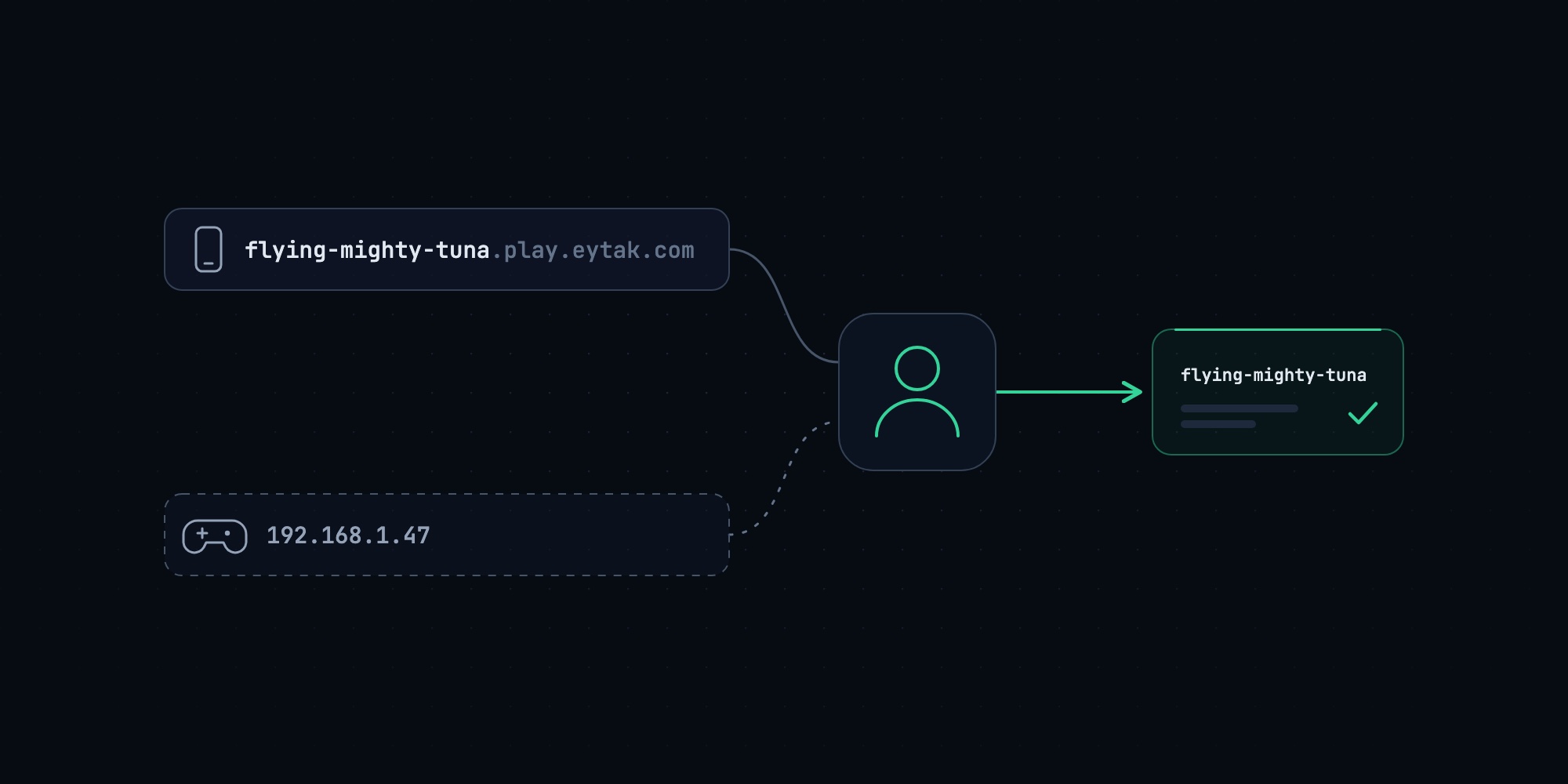
Minecraft on PlayStation and Xbox has no "Add Server" button, so a console player cannot type a server's address. On Eytak they can still join a Java server. Our edge router works out which server they mean from who they are, and the first time it has never met them, it asks once for the server's three-word name. This post explains why consoles were being turned away, what we changed, and why the fix was cheap for us to build.
It went live in both of our regions on 10 November 2026.
Why a console cannot join a Minecraft server by address
Minecraft: Bedrock Edition on Windows, Android and iOS has an "Add Server" screen with an address field and a port field. The PlayStation and Xbox versions do not. Their server tab lists a handful of featured partner servers and nothing else.
Console players have found a way round this for years. A phone app on the same Wi-Fi announces a remote server as if it were a LAN game. The console sees a "LAN game" in its Friends tab, joins the phone, and the phone relays the traffic to the real server.
That gets the player's packets to us. It does not tell us where they wanted to go.
What the logs showed: 40 refused, 28 admitted
Every Eytak server has one address, for example flying-mighty-tuna.play.eytak.com, and that address works from both Java Edition and Bedrock Edition. Our edge router reads the address the player's client says it is connecting to and sends the connection to the matching server. Thousands of servers share one IP address and one port this way.
A support ticket from a server owner whose Bedrock friends were being disconnected did not fit anything we knew. The server was healthy and Java players joined it without trouble. The edge had no record of those Bedrock players at all, because at the time it did not log a login it could not place. We added that log line and waited.
On the evening of 9 November 2026, over about three and a half hours on one node, the edge admitted 28 Bedrock logins and refused 40 with "Unknown server address". The refused logins had one thing in common. The address they carried was a private home-network IP.
typed in Add Server on a phone or PC:   flying-mighty-tuna.play.eytak.com
reported through a LAN relay app:       192.168.1.47
The console had joined the phone, so the console honestly reported the phone's address as the server it was connecting to. Three different households were behind those 40 attempts. Every one of those players was signed in with a real Microsoft account and had done everything right. None of them got in that evening.
We had read these players as rare. They were more than half of the Bedrock logins that reached that node that night.
How one address serves Java and Bedrock
Some background on the path, because the fix lives in the middle of it.
Java Edition and Bedrock Edition speak different network protocols. We run Geyser, the open-source protocol translator, once per node instead of once per server. A Bedrock player's connection arrives at that Geyser, comes out the other side as a Java connection, and goes through the same edge router a Java player goes through.
Bedrock client ──UDP──▶ node Geyser ──▶ edge router ──▶ the player's server
Java client ────TCP───────────────────▶ edge router ──▶ the player's server
Geyser passes along the address the Bedrock player typed, so the edge can route a Bedrock join exactly like a Java one. It also passes along the player's verified Xbox identity, encrypted, so the destination server knows who is joining. Every Eytak server has its own key for that identity data. The edge is the only place that can read what the node's Geyser wrote and re-encrypt it for one specific server. A key that leaks from one customer's server is useless on anybody else's.
That last property is what made the fix possible. By the time a login reaches the routing decision, the edge already knows who the player is.
Routing by who is joining
The edge now remembers, for each Bedrock player it admits by address, the servers that player has joined recently. The record expires 180 days after the player's last join.
When a Bedrock login arrives with an IP address where a server's name should be, the edge looks the player up and sends them to the most recent of their servers that still exists. From that point the login is ordinary. If the server has Bedrock switched off, the player is told so. If the server is asleep, the edge wakes it and holds the player while it boots, the same as for any other join. The server's own whitelist and bans apply as they always did.
Two limits are deliberate.
A hostname that names no server is still refused. Someone who mistypes an address on a phone gets an error, because sending them to "the server you probably meant" would put them in a world they did not ask for.
Only logins that come from our own Geyser on the same node are eligible. A connection from anywhere else that claims an identity is not believed.
A player who belongs to several Eytak servers lands on the one they joined most recently. There is no switcher yet.
The player we have never seen
Remembering works for a player who joined once from a phone or a PC and plays from a console afterwards. It does nothing for the server owner whose only device is a PlayStation, or for a younger sibling on a second account. They have never typed an address anywhere, so there is nothing to remember.
There is one place where they can type. Bedrock Edition lets a server show a form, and our Geyser can show one before it opens the connection to any server. A player the edge does not recognise sees a single question: which server, with a field for its three-word name.
The answer is resolved by the same code that resolves every other address, so flying mighty tuna, Flying-Mighty-Tuna, the full address and a customer's own domain all work. A wrong name shows the form again and says why, up to five times. A right name is remembered for that player and the login carries on. They are not asked a second time.
The form appears in English, Turkish, German or Dutch, following the player's game language.
Who gets asked is the edge's decision, and the rule is narrow: an address that cannot name a server, from a player with nothing remembered. Everybody who typed an address never meets this code. If the edge cannot be reached to answer the question, nobody is held, and the login proceeds as it would have before the form existed.
What we decided against
The common answer to console joins in this industry is a bot Xbox account. The player adds the bot as a friend, the bot appears to be hosting a game, and joining it transfers the player to the server.
We built none of the three designs we sketched along those lines. Each one asks a twelve-year-old to find a gamertag, send a friend request, wait for it to be accepted and then map the bot to a server. Each one also depends on an account that a platform holder can suspend on a bad day, which would take every console player on Eytak down with it.
The players in our logs had already solved the hard part themselves. They were standing at the door. The work was to stop refusing them.
Why this depended on owning the edge
Most Minecraft hosts hand each server an IP address and a port and let the player connect to it directly. There is nothing in the middle that sees every join, so there is nowhere to ask "who is this, and where do they usually go?"
We wrote our own edge router in July 2026 for an unrelated reason: we wanted every server to have a readable address with no port in it. The same router later let a sleeping server wake when somebody joins, then let Bedrock and Java share one address. Routing by player was a few hundred lines on top of those decisions, written and deployed in two days. Without them it would have been a new product.
How we tested it, and what we have not tested
We test Bedrock paths with a scripted Bedrock client that signs in with a real Microsoft account. For this work it gained one ability: to connect to our node while reporting a home-network IP as its address, which is exactly what a relayed console does.
Against the production Geyser build, the production edge and a real Paper server, that client was held and shown the form. A wrong name was refused with the reason. The right name, typed with spaces from a Turkish-language client, joined. The same player joining again saw no form. A player who typed the address saw no form. Closing the form ended the session cleanly, five wrong names ended with a message to ask the server's owner, and with the edge made unreachable nobody was held. We repeated the form, the refusal and the clean exit in production on both regions.
What we have not done is hold a controller. As this post goes out, no PlayStation or Xbox on our own desks has been through this path, and the evening of the rollout ended before a console player arrived on the new code. The edge now logs the device type of every Bedrock login, so we will know the share of consoles from our own data and will update this post with it. We have not tested Nintendo Switch at all and promise nothing for it.
Common questions
Can PlayStation and Xbox players join a Minecraft Java Edition server?
Yes, if the server translates the Bedrock protocol and the console can reach it. On Eytak, a server with Bedrock support switched on accepts Bedrock players at the same address as Java players. A console reaches it through a phone app on the same Wi-Fi that shows the server as a LAN game.
Why does my console say "Unknown server address"?
The console is reporting the address of the phone it joined, and the host cannot tell which server you meant. This is what Eytak's edge used to answer too. It now recognises you by your Microsoft account, or asks you once for the server's name.
Does the server owner have to set anything up?
No. If Bedrock support is on for the server, recognition and the one-time question work without any configuration, plugin or port.
What do I type when the game asks which server?
The server's three-word name, with spaces or hyphens, in any capitalisation. The server's connect page shows it. The full address works as well.
Does this need Minecraft Realms or a paid console subscription from Eytak?
It does not use Realms. Whether your console needs its platform's online subscription to play multiplayer is the platform's rule and applies to any server.
Is routing by player safe?
The identity comes from the player's Microsoft account sign-in, travels encrypted, and is only accepted from our own translator on the same machine. Being routed to a server grants nothing by itself: the server's whitelist, bans and permissions decide what happens next, exactly as when the address is typed.